
Appearance
Child Themes
Introduction
A child theme changes another theme — its parent — without copying it. It holds only what it changes: a template, a layout, a component, a few colours. Everything else is the parent's, and when the parent is updated with composer update, the child gets the update too.
It works the way a WordPress child theme does. Where WordPress reads Template: twentytwentyfive from the child's style.css, kitloom reads the parent's name from the child's composer.json:
json
{
    "extra": {
        "kitloom": {
            "theme": {
                "parent": "Journal"
            }
        }
    }
}
A folder themes/Inkwell/ with that file and one changed template is a whole child theme. It needs no service provider and no package, and Appearance → Themes lists it beside the others.
Make one
From the application:
bash
php artisan kitloom:make-theme Inkwell --parent=JournalThis writes themes/Inkwell/:
| File | What it is |
|---|---|
composer.json | The parent's name, the child's name and description for its card, the parent's demo command |
resources/style.css | The child's own CSS, loaded after the parent's |
README.md | How to override, and every file of the parent you may override |
To start from some of the parent's files, name them with --copy. A Blade view is named by its path under resources/views, with or without .blade.php, dots or slashes; a Vue or React file by its path under resources/js:
bash
php artisan kitloom:make-theme Ledger --parent=BladeTheme --copy=layouts.app,partials/styles
php artisan kitloom:make-theme Inkwell --parent=Journal --copy=Components/Masthead.vue,Templates/page
Run on a child that already exists, the command copies only the files you name, and never over a file the child already has.
--package makes a Composer package instead of a folder: acme/inkwell-theme with a service provider, a test, the parent's package in require, wired into the application like any theme. Use it for a child you will install on several sites; use a folder for one site.
bash
php artisan kitloom:make-theme Inkwell --parent=Journal --package --vendor=acmeThe parent must be installed: a folder of themes/ or a package that declares a theme. A child of a child is refused, as in WordPress.
What a child can change
Templates
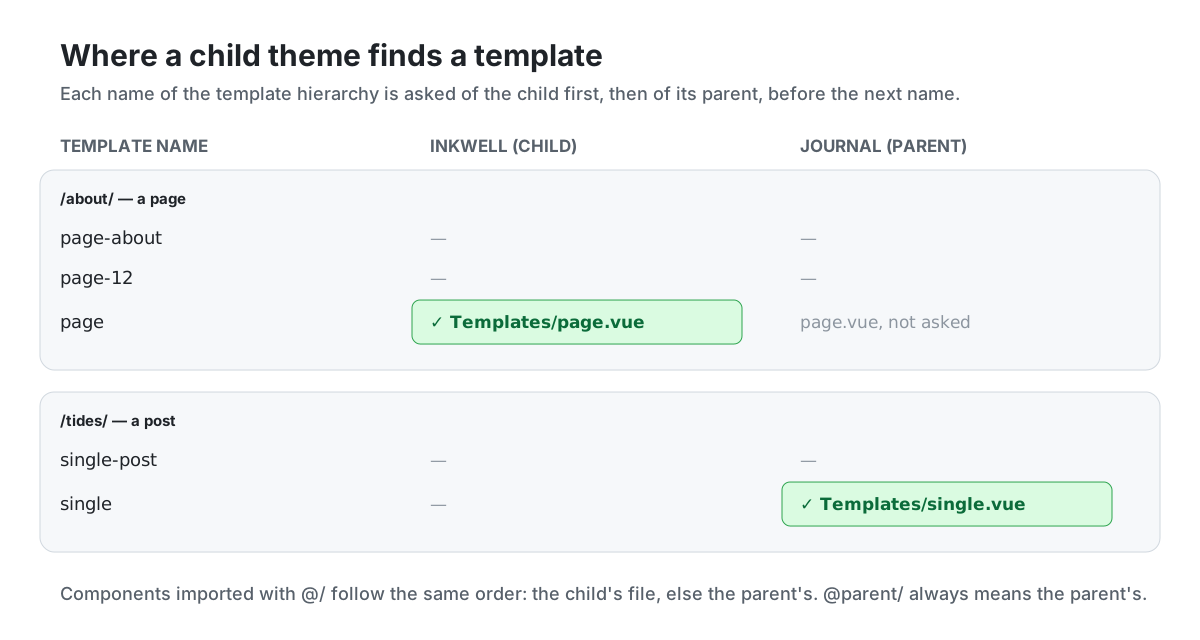
The template hierarchy asks for each template name in the child first, then in the parent, before it moves to the next name. On a single book the hierarchy asks for single-book, single, singular, index; if the parent has single-book and the child has only single, the parent's single-book wins. This is what locate_template() does in WordPress.
Blade views
A child's view of a name comes before the parent's, however it is named: @include('partials.footer'), @extends('theme::layouts.app'), a template, a shortcode's view. Put resources/views/partials/footer.blade.php in the child and every page has the child's footer, including pages drawn by the parent's templates.
parent:: names the parent's own view. A child's layout can wrap the parent's instead of copying it:
blade
{{-- themes/Ledger/resources/views/layouts/app.blade.php --}}
@extends('parent::layouts.app')
A Blade child's resources/style.css goes into the page head, in @siteHead, after the parent's styles. Every bundled theme keeps its colours in CSS variables, so a child that changes colours needs only this:
css
:root { --accent: #1d4ed8; }Vue and React components
In a Vue or React theme, @/ imports look in the child first, then in the parent. Put resources/js/Components/Masthead.vue in the child and every template that imports @/Components/Masthead.vue gets the child's masthead, the parent's templates included. @parent/ always means the parent's file, for a component that wraps the parent's:
vue
<script setup>
import ParentMasthead from '@parent/Components/Masthead.vue';
</script>

<template>
    <ParentMasthead v-bind="$attrs" />
    <p class="masthead-note">Printed in the hills</p>
</template>
A relative import inside the parent (./Masthead.vue) is not looked up in the child: only @/ is.
The child is built on its own, into public/build-Inkwell:
bash
APP_THEME=Inkwell npx vite buildnpm run build:themes builds it too, with every other theme. A child without resources/app.js is built from the parent's entry, and its resources/style.css is imported after the parent's styles. A child with an entry of its own is built from that.
Every bundled Vue and React theme imports its templates from virtual:kitloom-templates, which holds both themes' templates by name, so any of them can be a parent. A theme of your own does the same:
js
import templates from 'virtual:kitloom-templates';

createInertiaApp({
    resolve: (name) => (templates[name] ?? templates.index).default,
    // …
});
Words
A child's lang/<locale>.json is read after the parent's, so its lines win.
What stays the parent's
While a child is active, the parent counts as active too, as WordPress loads both themes' functions.php. So everything the parent's service provider adds keeps working:
- its menu locations and widget zones, with the menus and widgets already in them;
- its post types, with their admin screens in Filament and Nova;
- the page parts its templates read, and the parts the child's provider adds after them;
- its database tables: activating the child runs the parent's migrations first, then the child's;
- its settings on Appearance → Customize, with values of the child's own;
- its demo command and its screenshot, until the child has its own.
A child with a service provider of its own (--package) boots after its parent, so a part or a listener it adds wins.
Activating
On Appearance → Themes, the child's card says Child of Journal. While the child is active, the parent's card says Parent of Inkwell. The console does the same:
bash
php artisan site:theme InkwellA child whose parent is not installed — or whose parent's package is switched off along with a module — is listed with the reason and cannot be activated.
The first time a child is activated, it starts from the parent's settings: the colours and the logo the owner picked stay. WordPress resets them instead. After that, the two themes keep separate values.
For AI agents
describe_site names the active theme and its parent, and resolve_url tells which template a page is drawn with. An agent asked to change a colour uses theme_customize; it does not write theme files.