
Appearance
Let your shoppers' AI assistants shop your store
More and more shoppers start with a question to an AI assistant, not with a search box: "a gift box for my sister, she loves nuts and dried fruit, under $30". The assistant answers from what it can find — a search engine's snippets, a crawl from last month, a marketplace listing — and the shopper ends up somewhere else, or on your site with a price that changed and a size that sold out.
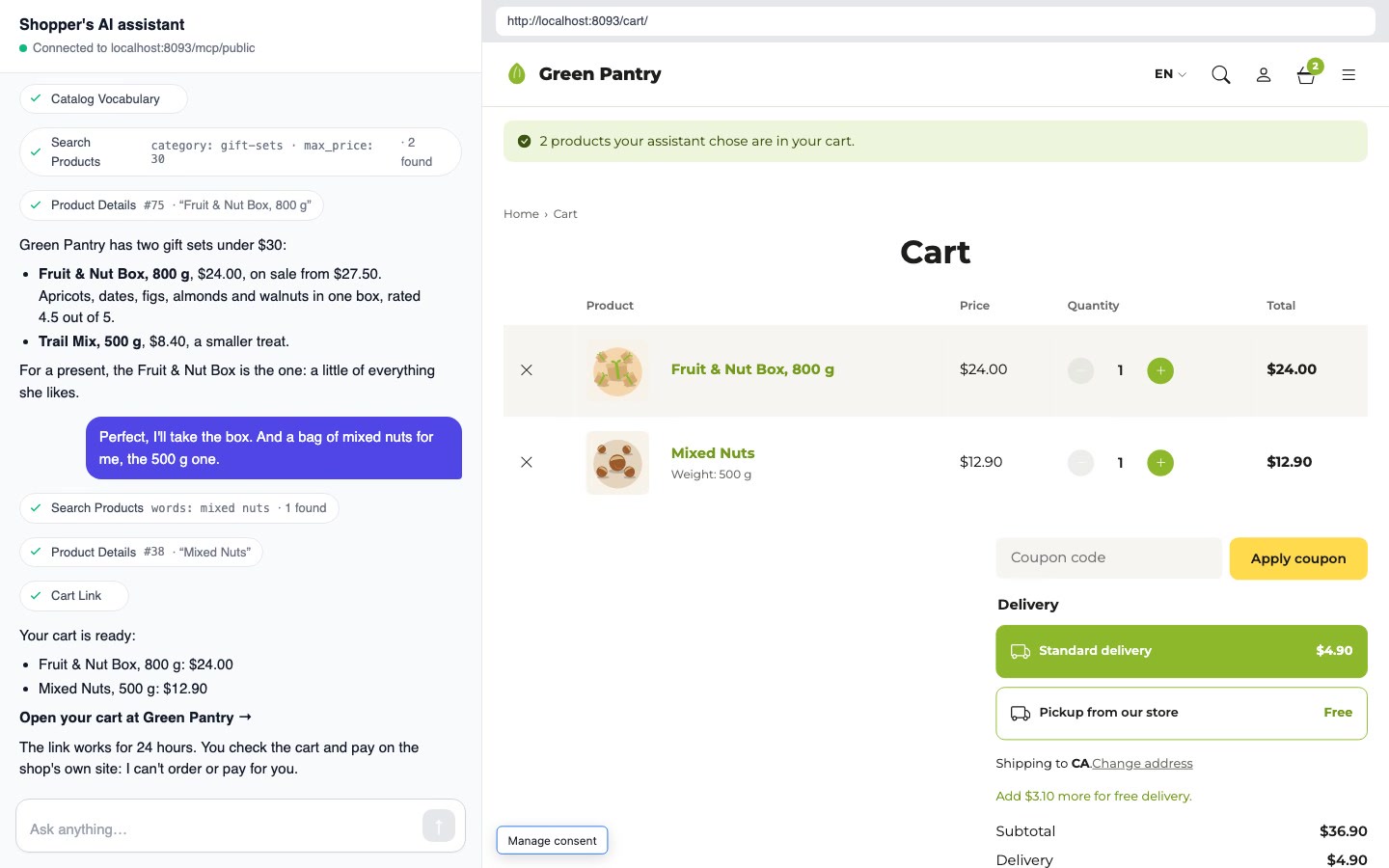
kitloom shops can now answer those assistants themselves. The new Public AI Agents module opens an MCP address on your site, /mcp/public. A shopper adds it to their assistant once; from then on the assistant asks your catalogue, in your categories and sizes, at today's prices and stock — and when the shopper has chosen, it hands them a link that fills a cart on your site. The checkout stays yours.
Two doors, two kinds of agent
kitloom already had a door for AI agents: /mcp, where Claude, Cursor or your own agent runs the site — writes posts, fixes redirects, moves orders on — with the rights of the user whose key it holds. That door is for you and your staff.
The new one is for everybody else, and it is built the other way round:
Your agents (kitloom/ai) | Shoppers' assistants (kitloom/public-agents) | |
|---|---|---|
| Address | /mcp | /mcp/public |
| Who | you and your staff | any visitor |
| Key | an application password per user | none, no sign-in |
| Sees | what that user may see | what any visitor sees |
| Writes | through the admin's writers, as that user | nothing |
| Tools | content, media, settings, every module's | the shop's catalogue and a cart link |
Nothing crosses between them. A public tool has no user to act as, so there is nothing to sign in as and nothing to escalate to.
What the assistant can do
With the Shop installed, the public address serves four tools:
catalog_vocabulary— the shop's own words: the category tree with how many products each holds, the attributes (weight, size, colour…) with every value, the price range, the currency. The assistant calls it first and turns "something for a tea lover, not too big" into your categories and values instead of guessing.search_products— keywords and the shop's own filters: a category with its subcategories, attribute values, a price range, on sale, in stock, a minimal rating, a sort order. Products that have every word come first; when none has them all, those with any, and the answer says which.product_details— one product as a shopper reads it on its page: descriptions, categories, tags, attributes, and for a variable product every variation the shopper can pick, with its price and stock. The rating and the number of reviews — never the reviews' text.cart_link— up to 20 products with their quantities and variations, turned into a link to your site.
The catalogue is read with the same query your shop pages use: published products only, not hidden from the catalogue, out-of-stock ones as your Hide out of stock items setting says. Drafts, private products, orders, customers and coupons never leave through this address.
The cart link
The assistant never orders and never pays. What it gives the shopper is an address on your site:
text
https://your-shop.com/wp-json/wc/store/v1/cart/link?items=75:1,38:1:41&expires=…&signature=…It is signed by your application key and works for 24 hours, so a link edited by hand — another product, a quantity of 40 — is refused. Opening it puts the products into the shopper's own cart and shows the cart page, with a notice that their assistant chose them. Something that sold out in between is said there; the rest is added.
From that moment it is your shop as usual: your shipping rates, your coupons, your payment methods, your checkout fields. The e-commerce events your analytics and ad pixels listen to — add_to_cart, begin_checkout, purchase — fire as for any other visitor.
One switch for the owner
The address is closed until you open it. Public AI Agents → Settings, in either admin:
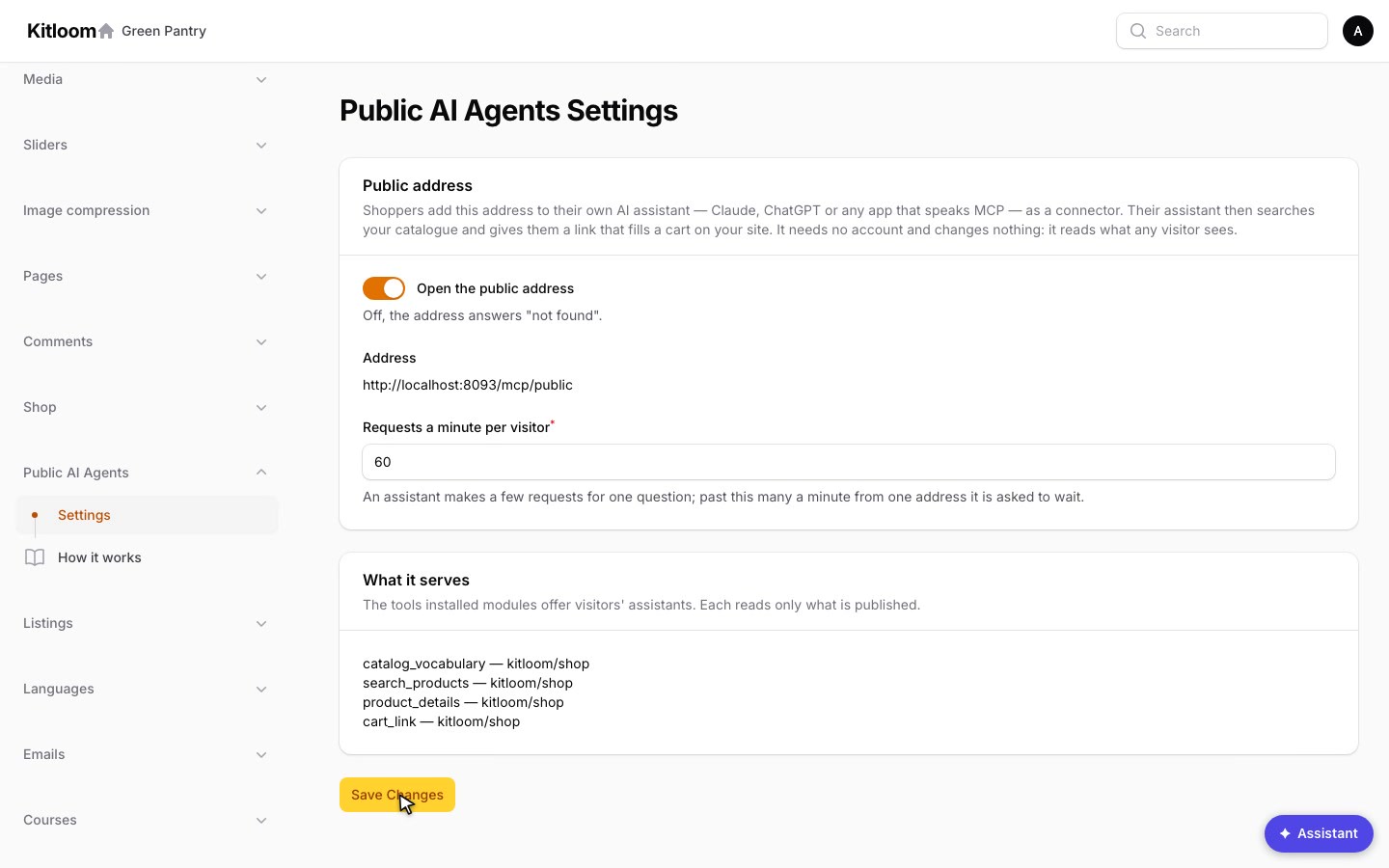
- Open the public address. Off, the address answers 404.
- Address — the URL to put where shoppers look for it: the footer, the help page, an "Ask your AI assistant" note on the shop page.
- Requests a minute per visitor — 60 by default. An assistant makes a few requests per question; past the limit one visitor's address waits for the rest of the minute. Cart links have a limit of their own.
Only administrators have the page (manage_public_agents). Your own AI agents cannot open or close the address: its settings are on the list of settings agents may read but never change, with the other doors into the site.
How a shopper connects
The assistant needs the address and nothing else:
- Claude (claude.ai, the desktop and phone apps): Settings → Connectors → Add custom connector, the URL
https://your-shop.com/mcp/public, no authentication. - Claude Code, Cursor, VS Code and other MCP clients: a remote HTTP server at the same URL, for example
claude mcp add --transport http your-shop https://your-shop.com/mcp/public. - Any other assistant that can add a remote MCP server, the same way.
The server introduces itself with your site's name and tells the assistant how to use it: the vocabulary first, then search, then details, and a cart link at the end — and that nothing here signs in, orders or pays.
What it is not
It is not a feed for a marketplace and not a chatbot on your pages. You do not pay for anybody's model: the shopper's assistant runs on the shopper's account, and your site answers it as it answers a browser, with a few small JSON responses. It does not know who is asking, so there is no customer data to protect in it — and none to leak.
For developers: a tool of your own
Any module can offer tools at the public address. A tool is a PublicAgentTool tagged in the module's provider — the agent tool contract without a user, a permission and writes:
php
use Kitloom\WpSchema\Contracts\PublicAgentTool;

final readonly class OpeningHours implements PublicAgentTool
{
    public function name(): string { return 'opening_hours'; }

    public function module(): string { return 'acme/stores'; }

    public function description(): string
    {
        return 'The opening hours of every store, this week.';
    }

    public function schema(JsonSchema $schema): array { return []; }

    public function handle(array $arguments): array
    {
        return app(StoreHours::class)->thisWeek();
    }
}
php
$this->app->tag([OpeningHours::class], PublicAgentTool::TAG);It reads what any visitor may see — outside the admin, kitloom's visibility scopes already see to that — and writes nothing. The module does not require Public AI Agents: without it nothing reads the tag.
Watch it
A two-minute lesson: the owner opens the address, then a shopper's assistant finds a gift and fills the cart.
Try it
Open a sandbox in one click, with no sign-up: Filament or Nova — a Pantry store, where Public AI Agents → Settings opens the address for your own assistant. Every detail of the module is in the Public AI Agents guide; your own agents, which run the site with a key, are on AI Agents, and public tools for your own modules in Extension Points.